Mastering the Kaweco Sport: A Complete Guide to Swapping Nibs for the Ultimate Writing Experience
The Kaweco Sport is a marvel of industrial design. Since its inception in 1911, this "pocket-sized" fountain pen has remained a favorite among enthusiasts for its unique octagonal cap and impressive portability. However, the true beauty of the Kaweco Sport lies not just in its iconic silhouette, but in its remarkable versatility.
Unlike many entry-level fountain pens that lock you into a single writing experience, the Kaweco Sport is designed with modularity in mind. Whether you want to transition from a fine line for note-taking to a bold double-broad for ink swatching, or you wish to upgrade from a steel nib to a luxurious 14k gold point, the process is accessible to even novice collectors. Understanding how to navigate the nuances of the Kaweco nib ecosystem is the key to transforming a simple writing instrument into a bespoke tool tailored to your hand.
The Modular Philosophy of Kaweco
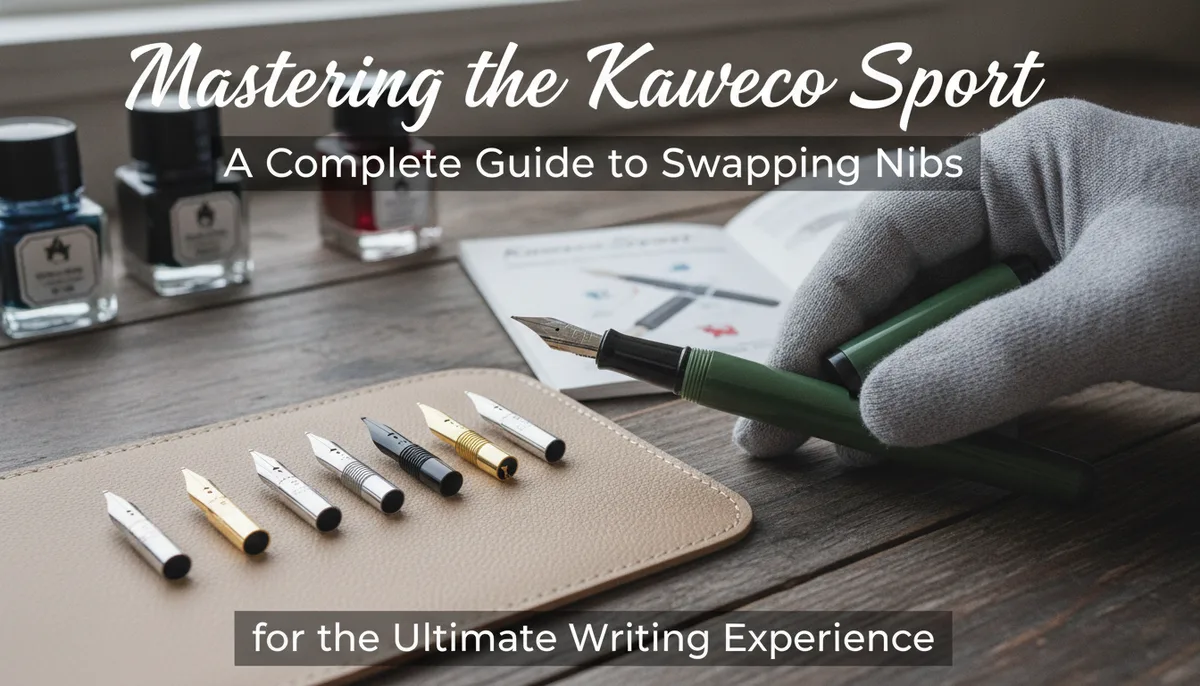
The Kaweco Sport is compact and stylish, and it’s compatible with a wide variety of replacement nibs. This modularity is a cornerstone of the brand's appeal. You can change the nib color—switching between silver, gold-plated, or even "black chrome" finishes—to match the trim of your pen. More importantly, you can keep a library of different nib sizes on hand to swap out whenever you’d like.
For those looking to elevate their writing, the option to upgrade to a 14k gold nib provides a level of "spring" and ink flow that steel nibs rarely achieve. While the steel nibs are legendary for their out-of-the-box reliability, the gold variants offer a softer, more cushioned feel that responds to the subtle pressures of your writing style. This versatility is particularly useful for those who use their pens for diverse tasks, such as journaling or professional correspondence. If you are still deciding how a fountain pen fits into your creative life, you might explore the nuances in Fountain Pens vs. Calligraphy Pens: Understanding the Essential Differences for Enthusiasts.
Identifying Your Kaweco Sport Model
Before you attempt to remove a nib, you must identify which version of the Sport you own. The instructions for changing your Kaweco Sport’s nib depends on the specific pen you have. While the aesthetic remains consistent across the line, the internal mechanics of the nib housing differ between the entry-level plastic models and the premium metal or carbon fiber editions.
The Plastic Series (Classic, Skyline, Frosted, and ICE)
Most plastic Kaweco Sports utilize a friction-fit system. In these models, the nib and the plastic feed are pushed directly into the grip section. There are no threads holding the nib unit in place; tension alone keeps the components secure.
The Premium Series (AL Sport, Brass, Steel, and AC Sport)
The metal versions of the Sport typically utilize a screw-in nib unit. This unit consists of the nib and feed pre-assembled inside a threaded plastic collar. This design allows for a very clean and quick swap, as you are replacing the entire housing rather than just the metal nib itself.
How to Swap Nibs on Plastic Kaweco Sports (Friction-Fit)
If you have a plastic Classic or Skyline Sport, the process requires a bit of tactile finesse. Because these parts are held in by friction, you will need to pull the nib and feed out of the section simultaneously.
- Empty and Clean the Pen: Before starting, remove the ink cartridge or converter and flush the pen with water. Working with a clean pen prevents ink from staining your fingers and ensures a better grip on the components.
- Grip the Nib and Feed: Use a soft cloth or a small piece of rubber (like a grip pad used for opening jars) to get a firm hold on the top of the nib and the underside of the feed.
- The Straight Pull: Pull the nib and feed straight out of the section. Avoid twisting, as the feed has a specific orientation and twisting could damage the delicate fins.
- Aligning the New Nib: Place your new nib onto the feed. There is usually a small indentation or "seat" on the feed where the nib should rest securely.
- Reinsertion: Look inside the grip section. You will notice that the internal shape is keyed (often with a flat side) to match the shape of the feed. Align the feed and nib assembly with this internal shape and push firmly until the nib is seated at the correct depth.
Swapping Threaded Nib Units (Metal Kaweco Sports)
The process for the AL Sport, Brass Sport, and other metal variants is significantly simpler and less messy. These models are designed for "nib units," which are self-contained modules.
- Unscrew the Section: Remove the cap and unscrew the grip section from the barrel of the pen.
- Unscrew the Unit: Grip the nib (using a cloth for protection) and the feed. Rotate the entire nib and feed assembly counter-clockwise. The entire plastic housing should unscrew from the metal grip section.
- Install the New Unit: Take your new Kaweco nib unit and thread it into the grip section by turning it clockwise. Hand-tight is sufficient; do not over-tighten, as you may crack the plastic collar.
- Check the Seal: Ensure the unit is flush against the section to prevent ink leaks.
Upgrading to the 14k Gold Nib
For many enthusiasts, the ultimate goal is to fit their favorite pocket pen with a 14k gold nib. Kaweco’s gold nibs are available in both the friction-fit style (nib only) and the full threaded unit style.
The primary benefit of gold is its resistance to corrosion and its natural elasticity. While a steel nib is rigid—perfect for carbon copies or fast note-taking—a gold nib offers a "bouncy" sensation. This makes long writing sessions, such as those found in a daily writing ritual, far more comfortable. If you are looking for the right canvas for such an upgraded writing experience, consider Finding Your Perfect Match: A Comprehensive Guide to Selecting the Best Journal for Your Writing Ritual.
When purchasing a gold nib, ensure you are buying the "060" size, which is the standard size for the Sport series.
Troubleshooting and Maintenance Tips
Even with the modular design of the Kaweco Sport, you may encounter minor hurdles during the swap process.
What if the nib is stuck?
If your plastic Sport has been sitting with ink in it for a long time, the dried ink can act like glue. Soak the section in a mixture of water and a drop of dish soap (or specialized pen flush) for several hours before attempting to pull the nib.
Aligning the "Sweet Spot"
After installing a new nib, always check the alignment of the tines. If one tine is higher than the other, the pen will feel "scratchy." You can gently nudge the tines into alignment with your fingernail, but be careful not to over-correct.
Dealing with Ink Flow Issues
If your new nib feels dry, it may be that the feed isn't pushed in quite far enough, or there is residual manufacturing oil on the nib. A quick wash with soapy water usually resolves flow issues on brand-new nibs.
Conclusion: A Pen That Grows With You
The ability to swap nibs transforms the Kaweco Sport from a disposable purchase into a lifelong companion. You can start with a basic plastic model and a medium steel nib, and over years of use, evolve it into a premium writing instrument with a 14k gold broad nib.
By mastering these techniques—whether you are performing a friction-fit pull on a Skyline or unscrewing a unit on a Brass Sport—you take ownership of your writing experience. The Kaweco Sport is more than just a pen; it is a customizable platform designed to adapt to your evolving style and needs. Keep your extra nibs in a safe place, and don't be afraid to experiment with different sizes to find the perfect match for your hand.